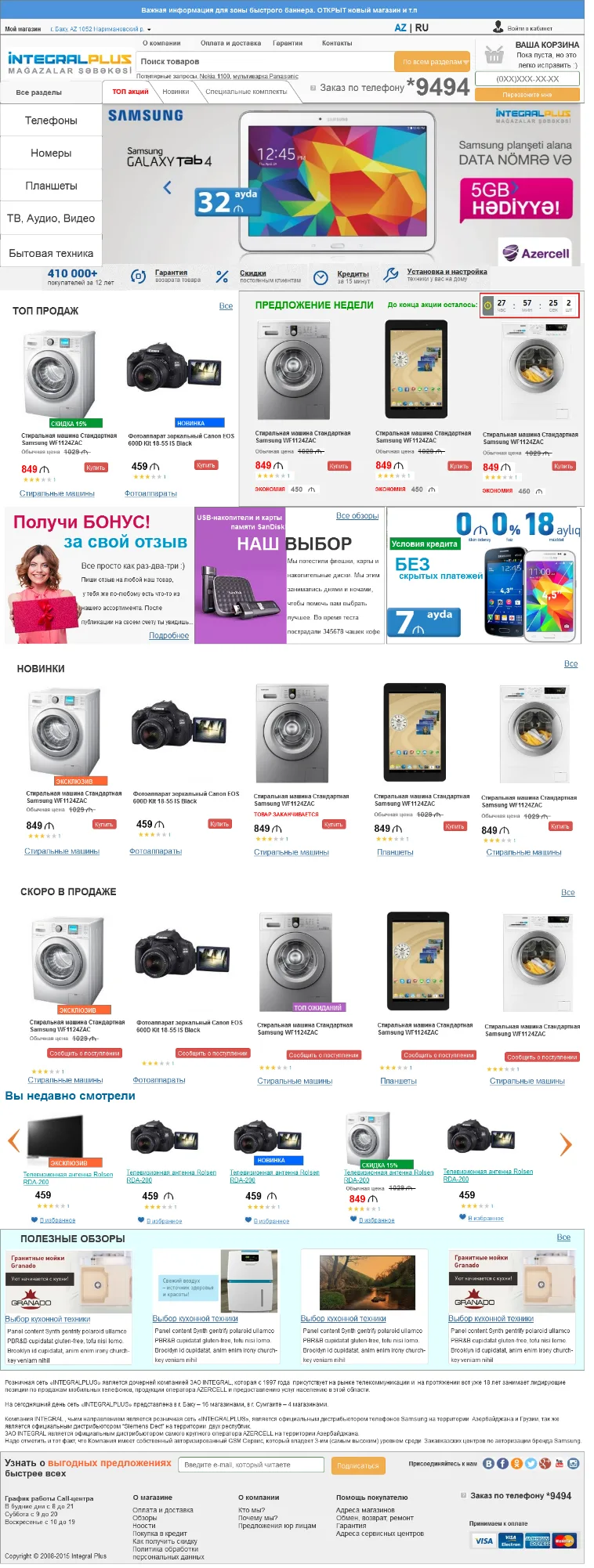
Website development and ongoing technical support are our core specialisation, so we are regularly asked to estimate the cost of a project without a technical specification, or simply to show what such a specification should look like. That is why we have put together and published a typical example of a full-scale specification for building an online store selling electronics and home appliances. This is the third part of the document: page layouts and the complete block of SEO requirements. Clients can use it as a basis for writing their own specifications for their own projects.
Page layouts
A full-scale technical specification always includes layouts, so that the client and the development team have the same understanding of exactly what will appear on the screen. This example describes the layouts of thirteen key pages of the store.
- Home page
- Catalogue page
- Product detail page
- Product comparison
- Cart
- Checkout, step 1
- Checkout, step 2
- Checkout, step 3
- Account section "Customer details"
- Order history
- Account section "Wish list"
- Account section "Waiting list"
- "Search results" page


Page addresses (URLs) and site structure
Duplicate URLs
- Every page on the site, whether static or generated dynamically, must be assigned only one unique address.
- Every product must be available at a single address only, even if it has been assigned to several product categories at once.
- Filters must produce one final URL regardless of the order in which the user selected them.
URL format requirements
Where possible, we recommend implementing the new address structure according to the following principle.
| Page type | URL format |
|---|---|
| Home | [domain].[domain zone]/ |
| Portal page (Smartphones and phones — in case landline and other types of phones are added to the range) | [domain].[domain zone]/[portal page]/ |
| Section (Smartphones and accessories) | [domain].[domain zone]/[section] |
| Category (Smartphones) | [domain].[domain zone]/[section or portal page]/[category]/ |
| Filter (Android) | [domain].[domain zone]/[category]/[filter]/ |
| Product page (Smartphone LG D325 L70 Dual Black) | [domain].[domain zone]/[category]/[product page].html |
| Information pages (About the store) | [domain].[domain zone]/[information page].html |
In line with the structure, several portal pages should be created — in particular the ones that will be linked from the mega menu. If the site has search or complex filtering by parameters, the characters ? and = may be used in the address no more than once each. All other non-letter and non-digit characters, as well as the space, apart from -, _ and # (for jumping within a page), must not be used.
Checkout page URLs
The addresses of the cart, the order form and the order confirmation page ("thank you for your order") must be static and identical for all users and for the purchase of any product. Order and visitor identifiers must not be passed in the URL.
Loading speed and redirects
For stable and fast indexing, the time it takes to serve a page's HTML code must be no more than 200–300 ms, and full page load no longer than 2–3 seconds. Optimisation recommendations are collected in the Google PageSpeed guide.
If these requirements are not met, a standard list of measures is put into action.
- Configure site caching.
- Optimise the page generation code.
- Move to more powerful hosting: for example, from shared hosting to a VDS or Dedicated server.
- Optimise the size of images, js and css files.
- Merge multiple js files into one.
- Merge multiple css files into one.
- Use a CDN for static content.
- Add Expires headers for images, css, js and other static content.
301 redirects
The site must have 301 redirect rules configured. Each page has only one address available to the user and to the search engine, while all its other variations automatically generated by the CMS are redirected to the main address in the format described above. The site must have one main domain: if other domains are attached to it, they must also be given 301 redirects. Every site has at least one www mirror.
In the .htaccess file this is done with a combination of RewriteEngine On, a set of RewriteCond conditions on the HTTP_HOST value for each mirror, and a final RewriteRule with the [R=301,L] flags, which redirects all mirror pages to the main domain.
- Trailing slash duplicates. Set up a redirect from the address without a trailing slash to the address with one — for example, from /catalog/smartphones to /catalog/smartphones/. At the same time, check that pages with an extension (say, /goods/smartphones/asus-zenfone-5-a501cg-16gb-charcoal-black-16gb.html) are not redirected to a version with a trailing slash.
- Home page duplicates. Eliminate the /index.php and /index.html addresses by 301-redirecting them to the site root.
- Multiple slashes. Reduce an address such as /catalog/////smartphones/ to /catalog/smartphones/ with a single redirect.
- First pagination page. For categories and sections, redirect /catalog/smartphones/page1/ to /catalog/smartphones/.
If the CMS entry point is the index.php script, it is more convenient to handle the redirect at the PHP level in order to avoid a redirect loop: read REQUEST_URI, find index.php in it, then send a 301 header and a Location without that fragment. Such code will also handle internal pages along the way: /category/index.php becomes /category/. The same approach is worth taking with multiple slashes: most ready-made .htaccess examples handle this case incorrectly and strip the extra slashes through a whole chain of redirects, whereas a regular expression at the entry point (the #/{2,}# pattern with a replacement by a single slash) does it in one step.
Non-existent URLs and the 404 page
Any non-existent page on the site must display the 404 page and return a 404 code. To test this, introduce errors into different parts of the address and for different site modules — they may be handled by completely different mechanisms.
- An error in the name of an information page: /cXntacts
- An error in a product name: /catalog/obXect1.html
- An error in a catalogue section name: /cXtalog/object1.html
- An error inside a third-party module: /other-module/itXm.html
- Going beyond the pagination range: if the catalogue has 10 pages, enter 11 — a 404 must be returned, not an empty /catalog/11 page
Technically, the 404 page must have one permanent address — for example, /404.html. If a user lands on /catalog/smartphones/error-page1515, we make a 301 redirect to /catalog/smartphones/404.html. When 404 errors appear in the webmaster tools panel, you need to track exactly which addresses they point to and create redirect rules for them.
Unique content and metadata templates
On section pages, product category pages, brand pages inside categories and also on filter pages, it must be possible to place unique optimised texts and metadata: optimised text in the category below the item listing, a first-level page heading (there must be only one such element on any page), plus the title, description and the remaining service tags.
Templated metadata
Separately, we implement templated optimised metadata across all pages of the site. This is a set of templates: different ones are applied to different groups of pages, and variable values are inserted into them depending on the content of the page.
- Section — Smartphones and accessories
- Product category — Smartphones
- Brand — Samsung smartphones
- Filters or sets of filters — White Samsung smartphone
- Model name — Smartphone Samsung Galaxy S6 32Gb White Pearl; in a large number of categories this variable must be the sum of the variables {product category} {product brand} {product name}
An example template for categories. Title: [Category name]. Buy [category name in the singular, genitive case] in the online store, the best price in Azerbaijan. Meta name="Title": [Category name]. [Category name in the singular] at the best price in Baku. Description: [Category name] in the online store. Do you want to buy [category name in the singular, genitive case] in Baku at a low price with delivery across Azerbaijan?
Once the variables are substituted, we get: "Tablets. Buy a tablet in the online store, the best price in Azerbaijan" or "Coffee makers. Buy a coffee maker in the online store, the best price in Azerbaijan" — together with the matching descriptions carrying the store name Integralplus.
Templates for the combinations category + brand, category + filter and category + two filters are built on the same principle: the brand name or the filter parameters are additionally inserted into the title and the description. For pagination pages, "Page 2", "Page 3" and so on are appended to the base title, meta title and description.
Headings and duplicate content
On every page of the site we implement a main first-level heading. It must be settable both automatically and manually, and contain an SEO-oriented page name or the product name. Text headings go into second-level tags, and headings unrelated to SEO into third-level and lower tags.
All texts and metadata on the site must exist in a single copy. We check for and remove duplication in four typical places.
Pagination
Text and metadata marked up on the first catalogue page are duplicated across all pagination pages.
Nesting level n+1
Unique text and metadata from the section page are carried over to subsections and to brand pages inside categories.
Filtering
Category text and metadata must not end up on the filtering results page.
Alternative display
A catalogue shown in more than one view with a change of URL — as a list and as a grid of images — creates pairs of twin pages.
Pagination, robots.txt and sitemaps
The rel=next and rel=prev attributes
For product categories with pagination pages we implement the generation of rel=next and rel=prev metadata, following Google's recommendations. The logic is simple.
- The first page. Contains only rel="next" — a link to the next pagination page.
- Pages from the second to the second-to-last. Contain both rel="next" and rel="prev".
- The last page. Contains only rel="prev".
The href values can be relative or absolute addresses; if base is declared in the document, relative paths are resolved from the base URL. As an alternative, the value rel="previous" is allowed. With incorrect markup, Google will continue to index the content using its own heuristics rather than relying on the rel you specified. What this gives you: the transfer of natural link weight from internal pagination pages to the first page being promoted.
The robots.txt indexing rules file
The site must contain a robots.txt file at /robots.txt. The Host directive specifies the site's main domain, and the Sitemap directive the location of the sitemap. With Disallow directives we close off service and junk sections.
- On-site search results — for example, Disallow: /search?q=*
- The cart and the order form
- Sorting results in categories
- The alternative catalogue display (as a list, for example)
- Pages with specific GET parameters
- The site's administrative area and other service pages accessible to the search robot
It is advisable to accompany every Disallow directive with a comment — say, "Disallow: /admin — blocks indexing of the admin panel" or "Disallow: /*filter=* — filter pages".
The sitemap in .xml format
An .xml sitemap must be available at /sitemap.xml, following the sitemaps.org specification. For large sitemaps that take longer than 200 ms to generate, we build an update script and schedule it in cron once a day, or refresh it when the content changes; small sitemaps can be served on the fly.
The file lists all pages of the project that are being promoted or are informative: the home page, section pages, product category pages, brand pages inside categories, model pages and informative pages such as contacts and "About the store". For each page the address, the change frequency and the crawl priority are mandatory.
| Page type | changefreq | priority |
|---|---|---|
| Home page | always | 1 |
| Sections, product categories, brands in categories | daily | 0.8 |
| Model pages | weekly | 0.6 |
| Informative pages | monthly | 0.4 |
If the file contains more than 50,000 addresses, the sitemap has to be split into separate files, none of which exceeds 10 MB. The root sitemap.xml will then contain a list of the remaining files — sitemap_1.xml, sitemap_2.xml and so on.
The sitemap in .html format
Separately, we create an HTML sitemap and place a site-wide link to it on every page of the site. The sitemap must include all pages and be multi-level — no more than 100 links on a single page. On the last page of the sitemap we add a meta tag that closes it from further crawling.
SEO elements: internal linking and structured markup
Block-based internal linking
On the product page we display two blocks: "Similar products" — products from the same category, and "Bought together with this product" — products that were ordered in the same order as the current one. The blocks contain 3–5 products depending on the design and layout of the site; each item consists of an image, a linked name and a price. Product categories and sections must also contain "New arrivals" and "Popular products" blocks.
Rich snippets and semantic markup
So that rich snippets are shown in the search results, we add review markup and product markup to the product page, and navigation markup to all pages of the site. We specifically recommend the schema.org method: most of the sites where rich snippets really do appear use it.
Microformats are not officially supported in Ukraine. They are in beta testing and behave unpredictably — they may appear and disappear at different times, or show up only on certain pages of the site.From the text of the technical specification
Breadcrumbs
On all pages of the site we display a breadcrumbs block and position it above the page heading. The contents of the block are the path to the current page, starting from the home page and ending with the current one, with the current page no longer linked. Structured markup is built into the block's code from the start — the details are described in Google's breadcrumbs documentation.
Images, outgoing links and the information section
The alt and title attributes of images
We specify alt and title attributes for all images on the site. For product images, alt fully duplicates the product name, while title is built from the template [product name] + [additional word]. The list of additional words: buy, price, sale, description, photo, order, purchase, prices. For the site logo we specify the image title "Integralplus.az online store".
Outgoing links
All outgoing links on the site must be closed from indexing by search engines. In addition, we recommend technically implementing the ability to automatically close both all existing links and those that appear later.
The information section of the project
We create the information sections "News", "Reviews" and "Articles" and add links to them in the site navigation. Teasers of the materials from these sections must be displayed in dedicated blocks on the home page, in a section, in a product category and on a brand page inside a category — with direct links to the full versions of the materials.
On the product category page we display a block with teasers from the linked information sections. For example, news teasers about smartphones must be shown only in the "Smartphones" section, and news about Apple smartphones only on the "Apple smartphones" brand page.
Tracking codes
Migrating the analytics codes is a separate item in the technical specification: Google Analytics, the e-commerce code and Google Tag Manager. This is the part people most often remember only after launch — and lose their data history, so we lock it into the specification in advance.