If you are still hesitating over whether to move your web project to HTTP/2, the short answer is: you should. Using a real project as an example — the website of a retail store chain — we show how much faster the resource became after the switch. And exactly what you will have to do on the server to get the same result.
What the switch delivered on a real project
We measured the average page load time on one and the same site, changing only the access protocol. The difference between the slowest and the fastest option is more than a second and a half.
| Protocol version used for access | Average page load time |
|---|---|
| HTTP 1.x without optimization | 5.44 s |
| HTTP 1.x with optimization enabled: file concatenation, domain sharding | 5.07 s |
| SPDY/3.1 | 4.77 s |
| HTTP/2 | 3.91 s |
It is telling that classic HTTP 1.1 optimization gained only 0.37 seconds, whereas the change of protocol alone gained more than a second and a half. In other words, the bottleneck was not the size of the files, but the limitations of the way the data was transferred.
How this looks on the loading waterfalls
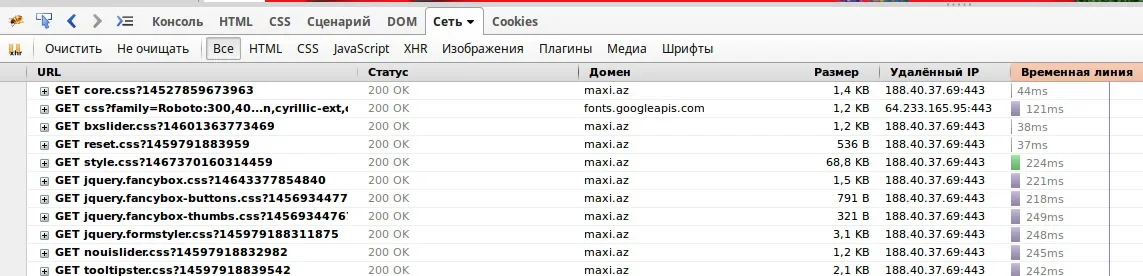
On the resource loading waterfall (js, css, images) for an HTTP 1.1 connection you can clearly see that the number of files downloaded simultaneously is limited by the number of streams the browser opens. Loading happens sequentially, and the timeline runs on for a long while. On top of that, the server side may also impose limits on the number of streams per browser. And let us not forget: all data is transferred as plain text.

On the waterfall for an HTTP/2 connection the picture is completely different. The timeline is short, and all resources load in parallel. If you inspect the data stream itself, you can confirm that resource contents travel in binary form, with additional ZIP compression applied on top.

Why the problem arose in the first place
Over the lifetime of HTTP 1.1, developers came up with a great many workarounds to get around the protocol's limitations.
- Domain sharding — a way to distribute a large number of files across different domains and CDNs, which addresses the problem of parallel connections.
- Sprites — combining a large number of small images into one big one to speed up page loading.
- File concatenation — the same idea as sprites, only for code: all the required CSS and JavaScript is merged into one big file so that it can be delivered in a single stream over a single connection.
- Built-in acceleration technologies in a CMS — some content management systems grew their own dedicated mechanisms for this.
The main differences between HTTP/2 and HTTP 1.1
Performance
The new specification is considerably faster and more efficient than HTTP 1.1.
Binary format
The protocol is more efficient to parse, more compact to transfer and less prone to errors.
Multiplexing
All files load in parallel. Requests and responses are split into frames with metadata that ties them together, so they do not overlap or create confusion. Responses arrive as they become ready, so heavy requests do not block the processing and delivery of simpler objects.
Prioritization
Along with multiplexing came traffic prioritization: requests can be assigned a priority based on importance and dependencies.
Header compression
HTTP is built so that requests carry headers with additional information, and the server adds headers to its responses as well. Since a page consists of many files, those headers add up to a considerable volume. In HTTP/2 they are compressed, so there is substantially less auxiliary information, and the browser can send all requests at once.
Forward momentum
All new versions of the popular web servers already support the protocol.
Encryption: why HTTP/2 almost always comes together with TLS
The HTTP/2 protocol itself does not require channel encryption. However, all modern browsers work with HTTP/2 only together with TLS — and so does Nginx. Widespread adoption of the protocol should therefore help spread encryption across the network.
That makes the logic simple: if you already use TLS, it is worth enabling HTTP/2, which unlocks the full potential of encryption. Establishing an encrypted connection involves only one TLS handshake, and that considerably simplifies the whole process and shortens connection time.
How well browsers support the protocol
At the time of measurement, the share of browser versions with HTTP/2 support looked like this.
| Browser versions with HTTP/2 support | Global Market Share |
|---|---|
| IE 11 on Windows 10 | 0.14% |
| Edge 12, 13 | 0.35% |
| Firefox 36—45 | 5.09% |
| Chrome 41—49 | 15.06% |
| Safari 9 | 0.91% |
| Opera 28—34 | 0.57% |
| Safari for iOS 9.1 | 1.07% |
| Opera 30 for Android | 0.01% |
| Chrome 46 for Android | 3.59% |
| Firefox 41 for Android | 0.01% |
| Total | 26.79% |
The rest of the audience simply carries on over HTTP 1.1 — the protocol is negotiated when the connection is established, so nobody is cut off.
How to enable HTTP/2 on your side
- Install an SSL certificate. Without TLS, modern browsers will not switch to HTTP/2, so the certificate is where you have to start.
- Check that the server advertises h2. Make a request to your domain through openssl s_client with the -nextprotoneg parameter. The response should contain a line along the lines of "Protocols advertised by server: h2, spdy/3.1, http/1.1".
- Enable the protocol in Nginx. You need version 1.9.5 or above. In the configuration file /etc/nginx/nginx.conf, inside the server section, extend the listen directive: listen 443 ssl http2; — server_name, ssl_certificate and ssl_certificate_key stay alongside it.
- Or extend your Apache configuration. Starting from version 2.4.17, an https server gets Protocols h2 http/1.1, and an http server gets Protocols h2c http/1.1.
- Turn off the workarounds you no longer need. File concatenation, domain sharding and the other tricks of the HTTP 1.1 era are no longer necessary after the switch.
What it all adds up to
The HTTP/2 protocol is far better optimized than HTTP 1.1: adopting it and applying minimal settings is enough to improve the performance of your web project. And turning off the extra tricks that were used to get around the limitations of HTTP 1.1 can lift an entire layer of business logic out of your system software and make the system faster still.
Tuning the server optimally for your loads, advising you on e-commerce, working out what went wrong if something did — all of that is best taken to specialists. Do not hesitate: move your projects to HTTP/2.