When the first look at a project makes it clear that "we do not know where the limits of what we do not know lie", we write a technical specification without an implementation spec — but with a detailed description of the business rules. Below is an example of such a document for a school management system: a complete set of rules, ready to be built on any framework, Laravel included.
When a technical specification is built on business rules
A classic specification describes the implementation: screens, fields, buttons, click-by-click scenarios. But some projects make it impossible to describe the implementation honestly at the outset — the domain is complex, and neither the client nor the team can yet see all of its limits. In that case we describe not the interface, but the rules by which the domain lives.
We do not know where the limits of what we do not know lie.The hallmark of a project that needs business rules instead of an implementation spec
The business opportunity for which a school takes on a project like this:
- Building and changing the timetable electronically.
- Communication between all interested participants on a single platform.
- Prompt and timely notification of everyone involved in the system.
- Access to all learning materials in electronic form.
- Automation of many teaching and administrative processes.
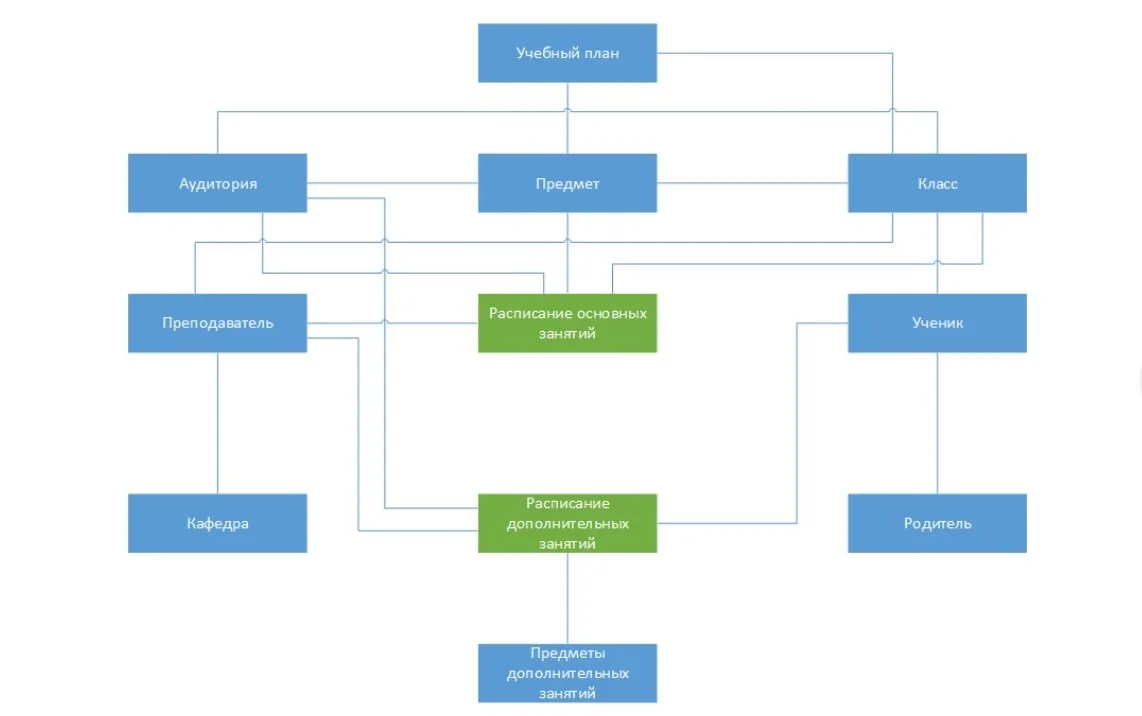
Elements of the domain and the rules of the school day

The first block covers functional rules and constraints that apply to the teaching process as a whole.
- BR-1. The system uses academic hours of instruction.
- BR-2. The system interface is developed in Ukrainian. Content entered by the school's users is also created in Ukrainian.
- BR-3. Any lessons and extra classes may only be held on working days, Monday to Friday.
- BR-4. No classes are held at the school on Saturday and Sunday.
- BR-5. The academic hour of instruction (lesson length) may differ depending on how classes are grouped by age: Grade 1, "primary school" — 35 minutes; Grades 2–4, "middle school" — 40 minutes; Grades 5–11, "senior school" — 45 minutes.
- BR-6. Some subjects and activities may have a special lesson length: physical education in Grades 5–11 — 45 minutes; a sports club from the extra package in the afternoon — from 45 to 60 minutes and more; the outdoor walk for Grades 2–4 — no less than an hour.
- BR-7. The length of the breaks between lessons is set separately for primary, middle and senior school; the breaks between lessons are the same on every day of the week. Once the compulsory programme has been completed, the breaks between the extra-package activities may differ depending on how the outdoor walk is scheduled, how the canteen operates and other factors.
- BR-8. Classes start at the same time on every day of the week for every class.
The numbers the rules fix rigidly:
Subject and curriculum
The curriculum is the foundation the whole year's timetable grows from. This is exactly where the constraints least obvious to a developer appear.
- BR-CURRICULUM1. The basis for building the timetable for the year is the curriculum (the study programme). The study programme is defined for every class and is characterised by the weekly hour load per class. The weekly load consists of the "compulsory programme" and the "extra package". The compulsory programme is set by the Ministry of Education.
- BR-CURRICULUM2. The compulsory programme may have several variants, for example a "basic programme" or the "Intelekt programme". In that case the head of studies notes this in the name of the curriculum — say, the working curriculum for Grades 1–3 based on the "Intelekt" research and methodology project. The maximum weekly hour load is defined for a class depending on the year of study.
- BR-CURRICULUM3. The "extra package" is the set of subjects included in the study plan in addition to what the school offers beyond the "compulsory study programme". Subjects from the extra package are placed in the timetable of the school day after the subjects of the compulsory programme.
- BR-CURRICULUM4. The "extra package" may also include additional hours of subjects from the compulsory programme. In that case there is no difference in the timetable between compulsory and additional hours.
- BR-CURRICULUM5. When the weekly load is composed, different templates of the basic study programme (for example the "Intelekt" programme) and different templates of the extra package (for example "Extra package No. 1") may be used. In other words, different study programme templates may be applied within one group of classes: Grade 2-A studies under the standard programme from the Ministry of Education, while Grade 2-B studies under the "Intelekt" programme.
- BR-CURRICULUM6. The weekly load is distributed across classes by semester for the academic year. The weekly load cannot change during a semester.
- BR-CURRICULUM7. The number of hours per subject in the weekly load is stated in whole hours. If the number of hours is not whole, it may only be a multiple of 0.5.
- BR-CURRICULUM8. The timetable (the distribution of lessons) of the weekly load may differ between semesters.
- BR-CURRICULUM9. A non-whole number of hours can be distributed in two ways: a different number of hours on even and odd weeks, or a different number of hours in different semesters.
- BR-CURRICULUM10. The weekly load is distributed using a reference list of days off, public holidays and vacation periods. The first semester normally lasts 16 weeks, the second 19 weeks. Information about vacation periods, days off and public holidays is set by the "Working curriculum" document and is known at the start of the academic year.
- BR-CURRICULUM11. Once the weekly load has been distributed, the number of teaching weeks is not checked.
- BR-CURRICULUM12. Once the weekly load has been distributed, the resulting timetable can be adjusted manually — changing which days count as vacation and which as teaching days.
Class, groups and streams
- BR-CLASS1. A class is defined by its level (1, 2, 3 … 11 and a letter if there are parallel classes: A, B, V … Ya), its study programme and its roster of students.
- BR-CLASS2. A teacher can be the supervisor of only one class.
- BR-CLASS3. Some subjects require the class to be split into groups. The criteria for splitting may be: no more than 10 people in a foreign language group; a split by level of foreign language proficiency — elementary, intermediate, advanced (the number of levels may vary; this is normally applied to the subject "second foreign language"); boys and girls study in separate groups in handicrafts. In physical education (the core lesson) there is no split into groups by gender.
- BR-CLASS4. A class may have hours of unavailability set for specific days of the week. No timetable is built for the class during that time.
- BR-CLASS5. For some subjects different classes can be merged into "streams": elementary-level foreign language for Grades 5–11 is taught as a single stream; physical education (extra package) for boys in Grade 2 is held together.
Classrooms
- BR-9. A classroom may have a special subject assigned that is taught only there: physics, chemistry, computer science. In that case the classroom counts as specialised.
- BR-10. Only classes in the assigned subject may be held in specialised classrooms.
- BR-11. One subject may have several specialised classrooms.
- BR-12. A subject with several specialised classrooms should preferably be assigned to a single classroom for each specific class.
- BR-13. Several subjects may be assigned to a classroom: Ukrainian language and literature.
- BR-14. Some classrooms belong to the general pool — any class may be held in them: the library, the lecture hall, the multipurpose studio.
- BR-15. A class may be assigned a home classroom — "attached to the class".
- BR-16. Subjects without a specialised classroom should preferably be scheduled in the home classroom.
- BR-17. For Grade 1 and Grades 2–4 all subjects except the specialised ones are taught only in the assigned home classroom.
- BR-18. Only the assigned class may have lessons in the home classrooms of Grade 1 and Grades 2–4. Lessons of other classes are not allowed there.
- BR-19. Lessons of other classes may be held in the home classrooms of Grades 5–11.
- BR-20. A maximum number of seats is set for each classroom. A class or group cannot have a lesson in a classroom with too few seats.
- BR-21. When a "stream" lesson is held, the number of students is the sum of the students in the merged classes and groups.
Teacher and canteen
Teacher
- BR-22. The subjects a teacher teaches are specified for that teacher.
- BR-23. A teacher of Grade 1 and Grades 2–4 may have a class attached to them in which they teach all subjects except the specialised ones.
- BR-24. Availability conditions may be set for a teacher: cannot hold lessons on certain days of the week; can hold lessons only during certain hours on certain days of the week; cannot hold lessons in a given semester if the contract covers only one semester.
Canteen
- BR-25. The canteen has a start time and a duration set for each meal: breakfast, lunch, afternoon snack, dinner.
- BR-26. The time a class needs to spend in the canteen is defined. For all classes from 1 to 11 this time is the same — it is the visit interval.
- BR-27. The number of seats in the canteen is defined, and the students of the classes present there at the same time cannot exceed it.
- BR-28. The classes present in the canteen at the same time during a visit interval form a group.
- BR-29. The canteen schedule is built from groups of classes and the intervals at which they visit the canteen. The result is the "Canteen schedule" document.
Rules for building the timetable
The mandatory conditions are teacher availability and the number of seats in the classrooms (BR-30). Next come the rules for splitting, merging and ordering.
- BR-31. When a class is split into subgroups, the lessons are held in different classrooms by different teachers.
- BR-32. When a class is split into subgroups, lessons in different subjects may be held at the same time, for example English and computer science.
- BR-33. When classes are merged into streams, the lesson is held in one classroom by one teacher.
The order in which subjects are placed in the timetable:
- Part-time teachers first. Subjects taught by part-time teachers are placed first (BR-34).
- Then the heaviest subjects. Next come the subjects with the largest number of hours in the weekly load (BR-35).
- Then the streams. Subjects that allow streams to be formed are placed last (BR-36).
Preferences the system takes into account where possible:
- BR-37. Where possible, do not schedule more than 2 language subjects on one day.
- BR-38. Where possible, do not schedule more than 2 exact-science subjects: mathematics, physics, chemistry.
- BR-39. Physical education should preferably not be the first lesson.
- BR-40. Use the preferred subjects for the first lessons: reading, mathematics. Applies to Grades 1–4.
- BR-41. Do not schedule exact-science subjects on Thursday — applies to Grade 1.
- BR-42. Thursday has the minimum number of lessons — applies to Grade 1.
- BR-43. If no classrooms are free, the length of the outdoor walk may change.
- BR-44. The length of the outdoor walk may change to fit the canteen schedule.
Running lessons, the register and grading
The teacher's plan and the lesson
- TR-1. Before the academic semester begins, the teacher plans the weekly hour load. The result is a study plan for the semester, or the teacher's plan — a sequence of lessons with defined topics, practical sessions and tests.
- TR-2. Every academic hour corresponds to a lesson, described by its date, sequence number, topic and a detailed description of what will be studied.
- TR-3. A lesson also has homework attached, which is entered during the teaching process. It is a text description that may contain text, lists of exercises from the textbook, attached files and URLs.
- TR-4. The homework contains the assignment that has to be prepared for that lesson.
- TR-5. A lesson may have a test attached. Tests must be marked with extra indicators in the timetable.
- TR-6. For classes with the same hour load, where the basic programme and the extra package coincide, the study plan may be identical.
- TR-7. During the academic year the topics and content of the lessons actually held may differ from the planned ones.
The class register and attendance
- TR-8. In the class register the teacher records the subjects they teach, the study plan, the grades, the homework and the attendance.
- TR-9. The teacher records attendance for every subject in the class register. If a student is absent, this corresponds to the mark "Н".
- TR-15. After a grade is added, the date and time it was entered into the class register must be recorded.
- TR-16. Once a grade has been recorded, it cannot be adjusted. Only a user with the "Principal" role may edit it.
- TR-17. A grade cannot be added to the register for a past date.
- TR-18. Only one grade may be given to a student for one lesson.
Grades and exceptions
- TR-10. Grades are given as numbers from 1 to 12.
- TR-11. In Grades 1–2 no grades and no "pass" / "fail" marks are given. Only attendance is recorded.
- TR-12. Grades are given in Grades 3–11.
- TR-13. There are exceptions for certain subjects. Primary school students (Grades 1–4) are not graded in music, fine art, physical education and handicrafts. In these subjects a semester result and an annual result are given in the form of "pass" / "fail". For students in Grades 5–11 standard grading on the 12-point scale applies.
- TR-14. There are exceptions for students in Grades 5–11. Students assigned to the "special" physical education group are not graded: for them grading takes the form of "pass" / "fail". Each student belongs to one of the groups: core, preparatory, special.
- TR-19. The register may contain grades that are not tied to a specific date and lesson: the topic grade, the notebook grade, the final semester grade, the preliminary annual grade, the adjusted grade, the final annual grade.
- TR-20. When average grades are calculated, rounding is done in the student's favour.
- TR-21. Grades for tests carry the same weight as all the others.
- TR-22. The topic grade is the average grade for a completed topic. It is calculated automatically, with rounding in the student's favour. All grades for the lessons held since the previous topic grade are summed, including notebook grades. If there is no previous topic grade, the count starts from the beginning of the academic year.
- TR-23. The notebook is graded by the teacher. This type of grading exists only for the subjects "Ukrainian language", "Ukrainian literature" and "world literature".
- TR-24. The final semester grade is an average grade; only topic grades are taken into account. It is calculated automatically, with rounding in the student's favour.
- TR-25. The preliminary annual grade is an average grade; only semester grades are taken into account. It is calculated automatically.
- TR-26. The adjusted grade may be given as the outcome of an appeal against the preliminary annual grade.
- TR-27. The final annual grade is an average grade; the semester grades and the adjusted grade are taken into account.
Progress report
- TR-28. At the end of every month a "Progress report" is prepared for the student — a short assessment for each subject. It includes a list of grades and a comment for each subject, as well as a "personal development of the student" section.
- TR-29. For Grades 1–4 the short assessment of every student in every subject is written by the teacher attached to the class. For subjects taught by other teachers, the assessments are written by those teachers.
- TR-30. For Grades 5–11 the "Progress report" is written by the subject teachers, and the "personal development of the student" section by the class supervisor.
Core system functions: workstations, users and permissions
The domain rules are then broken down into automated workstations — by user role. Every workstation runs through a web interface.

The "School principal" workstation
- The lesson and bell timetable for the whole school.
- "Staff list".
- "Employee record card".
- "Class list".
- "List of students in a class".
- "Student personal file".
- Access to "school-wide documents".
The "Records clerk" workstation
A separate workstation for the records clerk (content manager), accessed through a web interface.
The "Teacher" workstation

- The teacher's plan.
- Lessons in the classroom.
- The teacher's timetable.
- Notification system.
- Class list.
- Students in a class.
- Student record card.
- Homework discussion.
The "Student" workstation
- The student's lesson timetable.
- Grade register.
- Homework.
- Messaging system.
- "Rules for students" — a static page, the same for the whole school, available in a responsive view.
The "Parents" workstation
- The student's lesson timetable.
- Grade register.
- Homework.
- Progress report.
- List of teachers.
- Study plans (the teacher's plan).
- Messaging system.
- "Rules for students" — a static page, the same for the whole school, available in a responsive view.
The "Class supervisor" workstation
- Homework.
- List of the class's teachers.
- The lesson and bell timetable for the class.
- Electronic register.
- Student progress report.
The "Head of studies" workstation
The workstation from which the system parameters are configured and the timetable is built on the basis of the curricula.
System users
| User | Headcount | Description |
|---|---|---|
| Principal | 1 | The core functions are access to the completed school timetable of core and extra lessons for reference. Access to staff lists, their contact details, personal cards and the substitution log. Access to rarely changed legal and administrative documents: the licence, the order book and so on. A few special functions with dedicated privileges: changing the final semester and annual grades. |
| Head of studies | several people | Works with the "Head of studies" automated workstation. An experienced user who configures the system parameters. |
| Records clerk (content manager) | 1 | Works with the "Records clerk" automated workstation. |
| Teacher | several dozen | Works with the "Teacher" automated workstation. |
| System administrator | 1 | A professional user who configures the system and formulates requests for new functionality. |
| Nurse | several people | Works with the "Medical room" automated workstation. Limited capabilities — access to the medical card, creation of incidents. |
| Canteen staff member | 1 | Works with the "Canteen" automated workstation. Limited capabilities, changing the operating hours. |
| Class supervisor | several dozen | Works with the "Class supervisor" automated workstation. Limited capabilities. |
| Student | several thousand | Functions for the learning process. |
| Parents | several thousand | Functionality for parents. |
| Unauthenticated user | — | — |
The permission system and the distribution of users across roles
Permissions go to groups
Permissions on the end objects and the operations on them are defined for user groups.
Users go into groups
Permissions are distributed to end users in the system by assigning those users to groups.
Objects are set at architecture stage
The number of end objects and the operations possible on them are defined at the architecture stage.
Groups can be extended
User groups can be added while the system is in use, and permissions on the end objects are assigned to them.
A specification in this format does not answer the question "what exactly will this look like" — it answers the question "by what rules does this have to work". The team designs the implementation only after the rules have been collected, checked and agreed with the school.