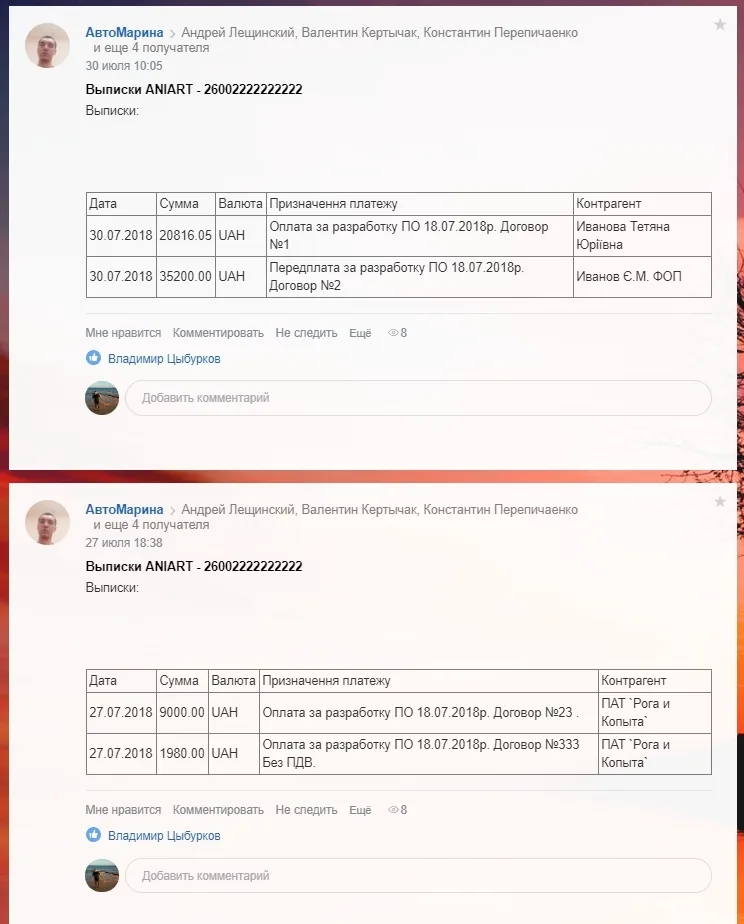
A single delayed bank notification can easily stall an entire project decision: the money has already arrived, but the manager only finds out the next day. The Online Banking module removes that pause — it pulls statements from your internet banking and publishes them straight into the activity stream of the corporate portal. Here is how the connector works, what it can do and where the idea came from. And for those who read to the end, there is a pleasant surprise.
The problem: financial information arrives too late
One of the key tasks of any business is the effective management of finances and accounting, without which no project can be delivered successfully. Almost every entrepreneur has run into difficulties passing financial reporting between managers and their teams.
Delays in bank notifications about money coming into or going out of an account often slow down key decisions on business projects, leading to losses and lost clients.
The Online Banking module solves this problem by integrating the corporate portal with your online bank. Data exchange is currently implemented for Privat24 — the largest online banking service in Ukraine.

Goals of the application
Fast notification
Keep management and the employees concerned promptly informed about incoming and outgoing bank transactions.
A fuller picture of the counterparty
Place payment information in the client's CRM record to build a more complete picture of the counterparty.
Less time spent on decisions
Shorten the time it takes to make management decisions: budget data is available exactly when it is needed.
A single information space
Create one space inside the company where financial information lives alongside day-to-day tasks.
The application is already available for download in the platform's application catalogue. Anyone who is already using the corporate portal can install it — and start receiving statements of bank transactions within 5 minutes of activation.
What the module can do
In the application settings you can specify any number of accounts for each legal entity. Every account has its own set of parameters that govern how its statements are processed. The handler requests statements for each account over a given period of time — starting from the last saved statement.
Thanks to the configuration interface, a user can:
- add new legal entities;
- add accounts for those legal entities;
- configure accounts that have already been added;
- choose which user the posts to the activity stream are published on behalf of;
- add a comment stating which account the statement came from;
- specify the statement type (debit, credit).

| Setting | What it gives you |
|---|---|
| Legal entities | Any number of companies in a single account — each with its own set of bank accounts |
| Accounts | For every legal entity you can add any number of accounts and configure them separately |
| Post author | The statement appears in the activity stream on behalf of the selected user |
| Comment on the statement | The message can state exactly which account the statement came from |
| Statement type | Debit or credit — only the type selected in the account settings goes into the stream |
| Refresh on demand | Fresh data can be requested manually on the settings page |
Notifications reach the stream only for the statement type specified in the account settings: money received into the account, money spent from the account. The application also lets you refresh the information on demand — this can be done on the settings page.
At the moment, integration with PrivatBank's online banking is implemented. Send us a request and we will connect the online bank that you use.
What the team gets along with the statements
The corporate portal is one of the most reliable systems in the world for optimising and automating business processes: it uses 10 security levels and contains every business tool you need:
- secure video and audio telephony;
- management of sales processes and staff;
- collaborative work on projects;
- electronic document management;
- file storage.
And now, on top of that, statements and account balances from Privat24 internet banking — the largest in Ukraine.

A use case from real office life
The idea behind the application came from Volodymyr Tsyburkov, a manager at ANIART. While explaining the technical details of the service, Volodymyr also answered the question of what prompted this project in the first place.
Volodymyr, how did the idea of integrating the corporate portal with Privat24 come about?
I run several projects at the same time. In our management cycle we use the corporate portal. Previously we had set up an import of the bank statement from the client-bank software into our accounting system, and the accountant received the information automatically, but because they have a great many other duties, that information was always posted with a certain delay. Sometimes the accountant forgot to publish it altogether. I and the other managers could not make project decisions in time, because we had no way of getting budget data in real time. Occasionally the problem affected our work in ways that were far from ideal.Volodymyr Tsyburkov, manager at ANIART
How was the integration implemented?
In this case there were no technical difficulties at all. We have built up enormous experience integrating the corporate portal with external services. I discussed the task with the developers, we looked through the technical documentation for the Autoclient module and the API, clarified the details and got to work.Volodymyr Tsyburkov, manager at ANIART
Did you have to deal with the developers and technical support of the client-bank service?
We have a lot of experience with all kinds of integrations with external services, and we know how hard communication with developers can sometimes be and how long you have to wait for an answer. This time, to our surprise, everything went smoothly and quickly. Having built and launched the application for ourselves, we thought that we were surely not the only ones who would find it useful, so we uploaded it to the application catalogue, where any user of the platform can download it completely free of charge.Volodymyr Tsyburkov, manager at ANIART
They say that if a licence is bought from you, you provide the module free of charge and help with installation and setup?
When you buy any platform licence from us, we provide our Online Banking module as a gift.Volodymyr Tsyburkov, manager at ANIART
How to start using the module
- Check your portal. The module is designed for companies that already work in the corporate portal — there is no separate infrastructure to deploy.
- Download the application. It sits in the platform's application catalogue, and any user can download it.
- Add legal entities and accounts. Each company gets its own set of accounts, and each account its own statement processing parameters.
- Configure publishing. Choose which user the posts to the activity stream are published on behalf of, whether the account number should be added as a comment, and which statement type you are interested in — debit or credit.
- Receive your first statement. Data on bank transactions starts coming in within 5 minutes of activation.
If you would like to use the Online Banking module in your own corporate portal, leave us a request and we will help you with the installation. If your bank is not on the list yet, write to us: we will connect the online bank that you use.
ANIART has long and successfully specialised in adapting and developing corporate portals for a wide range of business sectors — from integrations with accounting systems to connectors for external services.