Schools build timetables, keep registers, hunt for a substitute when a teacher falls ill and stay in touch with parents every single day — and mostly they still do it by hand. We have put together a set of online tools that takes this routine off their shoulders. It can quickly turn an ordinary school into a school of the future: it unlocks the institution's potential and makes its work far more efficient.
A complete set of online tools
The set covers the core areas of a school's work — from curricula and the timetable through to the canteen and access control on school grounds. Everything runs in a single environment: data is entered once and then used by every module.
- curriculum management
- electronic register
- electronic student diary
- electronic library
- automatic timetable generation
- academic performance reports
- canteen management
- access control on school grounds
- fast communication between school administration, parents and students
Effective. Convenient. Simple.The motto of the school toolset
Who works with the system
| Role | Core tools |
|---|---|
| Administration, head of studies | Curricula, automatic timetable generation, workload allocation, substitutions, performance reports |
| Teacher | Up-to-date timetable, electronic register, homework assignments and marking |
| Student | Electronic diary, materials from past and upcoming lessons, electronic library |
| Parents | Performance and attendance, communication with the teacher, live activity feed |
The administration manages the school timetable with ease
The experience of hundreds of heads of studies is built into a simple timetabling system. A perfect timetable for a large school takes only minutes: just select the curricula your institution follows, and the system produces a timetable for classes, teachers and rooms. Add your own constraints and you get the optimal option — one that suits teachers and students alike.

The head of studies runs the timetable
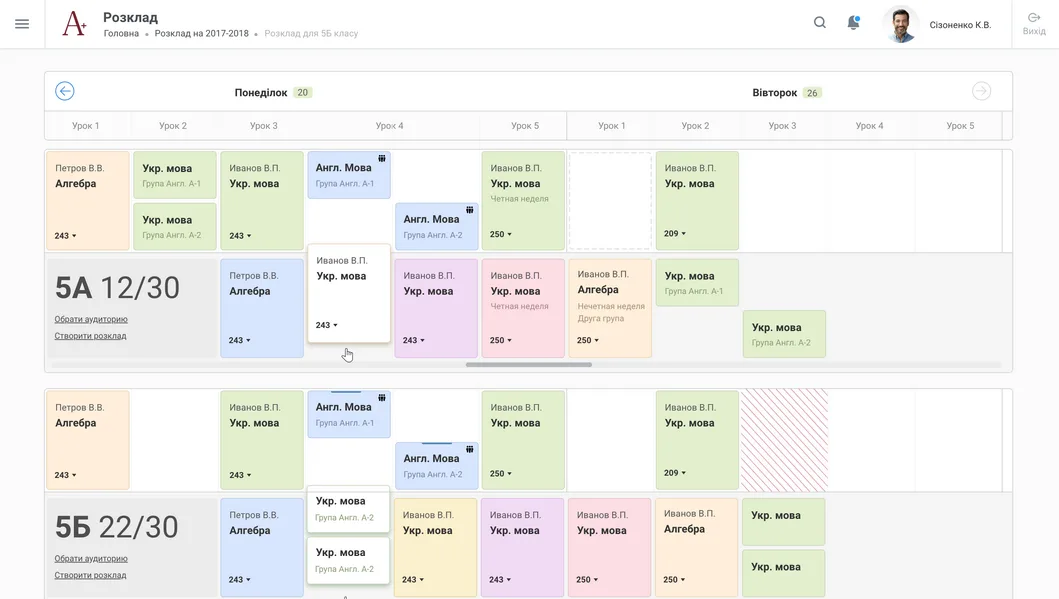
A simple, clear interface shows the current state of resources at a glance. By dragging lesson cards with the mouse, the head of studies assembles even the most complicated timetables and allocates workload — with no paper spreadsheets and no endless cross-checking.
- Select the curricula. The system takes the plans your institution actually works to.
- Add your own constraints. Teacher preferences, the specifics of your room stock, the school's rules of thumb.
- Get the timetable. For classes, for teachers and for rooms, all at once.
- Adjust it by hand. The timetable generated by the software can be edited manually by dragging lesson cards.
- Check for conflicts. The system reports any clashes and suggests the best way to resolve them.
- Publish it. The current timetable is instantly available on the phones of students, parents and teachers.
The timetable accounts for the specifics of any school
Unusual room stock, teacher preferences, splitting classes into groups, combined-stream lessons, odd and even weeks, division into semesters — all of it is defined in a simple visual builder. A few clicks of the mouse and the timetable is rebuilt around your specifics.
Rapid allocation of teaching hours produces every kind of timetable you need:
- the school-wide timetable
- a teacher's timetable
- a class timetable
- an individual timetable for each student
- a room timetable
- a timetable for extra activities, electives and clubs
Students have every learning material at hand
The electronic student diary keeps current, timely information in one place. All the materials from past and upcoming lessons are always at hand — on the website or on the student's own phone. Discussing homework with a classmate and a teacher, submitting completed work for marking, seeing the very latest news about timetable changes — it could not be simpler.

Immediate and long-term timetable changes
Changes happen constantly in the middle of the school year: a teacher is ill, a lesson is cancelled, a substitute is needed, groups are merged, a quarantine is announced. A few clicks of the mouse and the updated timetable is available on the phone for every class, every room, every teacher — or even for individual students. Every teacher has the current timetable, and it is always exactly the same one the students see.
Parents get the full picture, promptly
A student's performance and attendance are always within the parents' view. Homework that has been set can be discussed with the teacher straight from a phone, and completed work can be submitted for marking. Finding out the topic and material of missed lessons, seeing which topics are still to be studied — all of this lets parents keep track of every aspect of their child's education.
The student performance record
Parents get the full picture of performance by subject, as well as topic, final and special grades. The trend in the quality of knowledge gained is visible, not just a single mark for yesterday's test. All the information is available on the website and on a phone.
A single communication hub — the live feed
Every user of the system sees only personalised information — the information that concerns them. The system keeps everyone informed through a stream of updates: fast and precise.

- a student received a grade
- homework has been set
- a lesson substitution
- a student has left the school grounds
- school news
- incidents — a child bruised a knee, had a headache or a stomach ache, needs to bring a medical note
- business processes — bring a document, hand in a payment and so on
Powerful capabilities for the head of studies and the principal
This is a set of tools that makes the work of a school's head of studies and principal remarkably easy.
Automatic timetable generation
All your specifics and the school's empirical business rules are taken into account.
Timetable validation
The system reports any conflicts to you and suggests the best way to resolve them.
The timetable on mobile phones
Students, parents and teachers learn about every change as quickly as possible.
Manual adjustments
The timetable generated by the software can also be edited by hand.
Simple data entry
A minimum of buttons, superfluous pages and actions — a minimum of clicks and maximum working speed.
Substitutions
Prompt replacement of teachers, cancellation of lessons, merging of groups — recommendations on the best course of action and immediate notification of everyone involved: parents, students, teachers.
A library of video lessons and an action plan for the school
The set includes a library of training video lessons. It shows briefly what the daily routine starts with: how teaching hours are allocated in a few minutes and turn into a finished timetable, and how homework becomes available from any device — to students and parents alike.
For school administrations we have separately written out a detailed action plan, so that the move to the new tools is clear from day one. At launch, the set was offered to institutions under the "Forward-Looking School" programme — a full semester free of charge.
Together this gives a school one simple thing: less manual work for the administration and fewer misunderstandings between the school, its students and their parents. The timetable is built in minutes, changes reach everyone at once, and a child's performance is visible every day rather than at the end of the semester.